E-Commerce APP
Redesign case study focusing on AI to enhance usability
PROJECT NAME
Zara
Zara
ROLE
UX Designer & Researcher
UX Designer & Researcher
UX Designer & Researcher
PROJECT TYPE
HCI Thesis
HCI Thesis
DATEs
March 2024 - May 2024
March 2024 - May 2024

Phase 01 - The Challenge
Phase 01 - The Challenge
Phase 01 - The Challenge
Old Experience
Old Experience
Why does Zara’s app feel like a scavenger hunt?
Zara’s mobile app is sleek and fashion-forward, but users often struggle to find what they’re looking for.
Inconsistent layouts, confusing navigation, and weak personalization make shopping feel frustrating rather than effortless.
Why does Zara’s app feel like a scavenger hunt?
Zara’s mobile app is sleek and fashion-forward, but users often struggle to find what they’re looking for.
Inconsistent layouts, confusing navigation, and weak personalization make shopping feel frustrating rather than effortless.
Why does Zara’s app feel like a scavenger hunt?
Zara’s mobile app is sleek and fashion-forward, but users often struggle to find what they’re looking for.
Inconsistent layouts, confusing navigation, and weak personalization make shopping feel frustrating rather than effortless.

“I like that Zara has a lot of trendy options, but the app sometimes feels cluttered and I can’t find exactly what I want.”
– Frequent Zara user
“I like that Zara has a lot of trendy options, but the app sometimes feels cluttered and I can’t find exactly what I want.”
– Frequent Zara user
“I like that Zara has a lot of trendy options, but the app sometimes feels cluttered and I can’t find exactly what I want.”
– Frequent Zara user
Phase 02 - Understanding the Problem
Research Overview
TARGET USERS
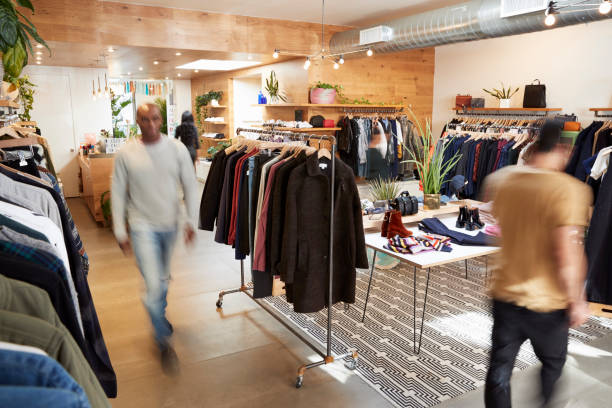
the BUSY shopper
She needs to find an outfit ASAP with an easy-to-use app or else she will check another site

the occasional shopper
He doesn’t really know how to find clothes he likes on the
app due to both navigation issues and either too few or too many options after searching

The SHOPPING ADDICT
She enjoys the luxury feel of Zara’s app and loves their
clothes, but can’t stand navigating the app, even after
using it for a while
surveys and evaluations
To evaluate Zara’s app navigation and information architecture, I conducted a heuristic evaluation followed by a survey with 9 participants — a mix of frequent and occasional shoppers.
This helped me see where usability broke down and how different users experienced the same interface.
KEY INSIGHTS
Homepage confusion
78% of users said the homepage felt cluttered and lacked clear navigation, making it hard for users to locate products or understand what was new
Brand appeal ≠ usability
77% of Frequent shoppers liked Zara’s modern aesthetic but struggled with poor organization and inconsistency
Overwhelming for new users
45% of infrequent users described product search as unintuitive and the homepage as overwhelming
Missing personalization
0% mentioned personalization as a strength. The lack of personalization and a simple Favorites system made shopping feel generic and frustrating
Both experienced and casual users loved Zara’s look — but they couldn’t navigate it confidently. This insight shaped my next phase: defining design goals to make the app as intuitive as it is stylish.
Phase 03 - Defining the Goals
Goal
Based on insights, I defined 3 clear design objectives:
Enhance personalization
by making recommendations feel relevant
Simplify navigation
by reducing confusion on homepage and menus
Refine favorites and shopping pages
by helping users browse and decide faster
Enhance personalization
by making recommendations feel relevant
Simplify navigation
by reducing confusion on homepage and menus
Refine favorites and shopping pages
by helping users browse and decide faster
Phase 04 - Testing
Four participants provided feedback on Zara’s mobile app, which shed light on key areas for improvement: product filtering, navigation, and the "favorites" feature. Below is a summary of challenges identified during usability testing, along with proposed solutions:
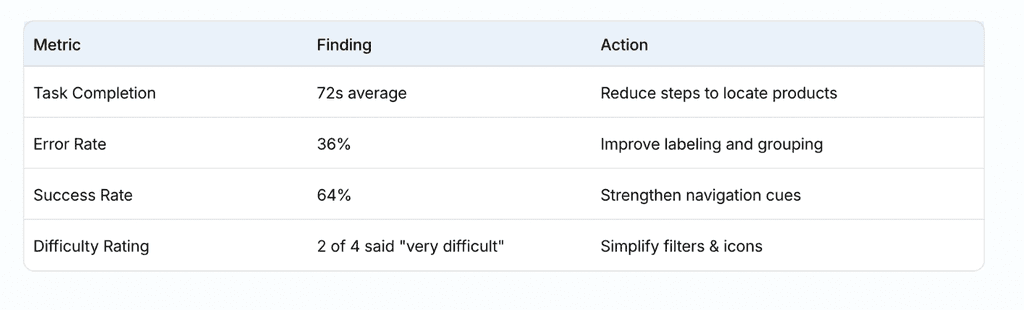
These testing results reitterated the 3 redesign opportunities:
Add AI Personalization
Homepage layout
Favorites structure
Phase 02 - Understanding the Problem
Phase 06 - Validation & User Perception
Research Overview
TARGET USERS
Prototype Validation
Prototype Validation
After building a mid-fidelity prototype, I shared the redesign with 6 previous participants for a quick feedback round. Instead of a full usability retest, I focused on perceived clarity and satisfaction.
Method: short online questionnaire + single NPS-style rating.
Highlights:
Average NPS increased from 12 → 48
5 of 6 users said the layout felt “more structured”
4 of 6 said navigation “made more sense instantly”
100% said they would prefer this new layout over the old one
Validation
User sentiment strongly suggested that the redesign improved both clarity and overall satisfaction — validating the core design directions before higher-fidelity testing.
Research Overview
TARGET USERS
the BUSY shopper
the BUSY shopper
She needs to find an outfit ASAP with an easy-to-use app or else she will check another site
She needs to find an outfit ASAP with an easy-to-use app or else she will check another site
the occasional shopper
the occasional shopper
He doesn’t really know how to find clothes he likes on the
app due to both navigation issues and either too few or too many options after searching
He doesn’t really know how to find clothes he likes on the
app due to both navigation issues and either too few or too many options after searching
The SHOPPING ADDICT
The SHOPPING ADDICT
She enjoys the luxury feel of Zara’s app and loves their
clothes, but can’t stand navigating the app, even after
using it for a while
She enjoys the luxury feel of Zara’s app and loves their
clothes, but can’t stand navigating the app, even after
using it for a while
surveys and evaluations
To evaluate Zara’s app navigation and information architecture, I conducted a heuristic evaluation followed by a survey with 9 participants — a mix of frequent and occasional shoppers.
This helped me see where usability broke down and how different users experienced the same interface.
KEY INSIGHTS
Homepage confusion
78% of users said the homepage felt cluttered and lacked clear navigation, making it hard for users to locate products or understand what was new
Brand appeal ≠ usability
77% of Frequent shoppers liked Zara’s modern aesthetic but struggled with poor organization and inconsistency
Overwhelming for new users
45% of infrequent users described product search as unintuitive and the homepage as overwhelming
Missing personalization
0% mentioned personalization as a strength. The lack of personalization and a simple Favorites system made shopping feel generic and frustrating
Both experienced and casual users loved Zara’s look — but they couldn’t navigate it confidently. This insight shaped my next phase: defining design goals to make the app as intuitive as it is stylish.
Phase 03 - Defining the Goals
Goal
Goal
Based on insights, I defined 3 clear design objectives:
Enhance personalization
by making recommendations feel relevant
Simplify navigation
by reducing confusion on homepage and menus
Refine favorites and shopping pages
by helping users browse and decide faster
Enhance personalization
by making recommendations feel relevant
Simplify navigation
by reducing confusion on homepage and menus
Refine favorites and shopping pages
by helping users browse and decide faster
Phase 04 - Testing
Four participants provided feedback on Zara’s mobile app, which shed light on key areas for improvement: product filtering, navigation, and the "favorites" feature. Below is a summary of challenges identified during usability testing, along with proposed solutions:
Metric
Finding
Action
Task Completion
Task Completion
72s average
72s average
Reduce steps to locate products
Reduce steps to locate products
Error Rate
Error Rate
36%
36%
Improve labeling and grouping
Improve labeling and grouping
Success Rate
Success Rate
64%
64%
Strengthen navigation cues
Strengthen navigation cues
Difficulty Rating
Difficulty Rating
2 of 4 said "very difficult"
2 of 4 said "very difficult"
Simplify filters & icons
Simplify filters & icons
These testing results reitterated the 3 redesign opportunities:
Add AI Personalization
Homepage layout
Favorites structure
Phase 05 - Design Exploration & Solutions
Phase 05 - Design Exploration & Solutions
Before and After Designs
Before and After Designs
Before and After Designs
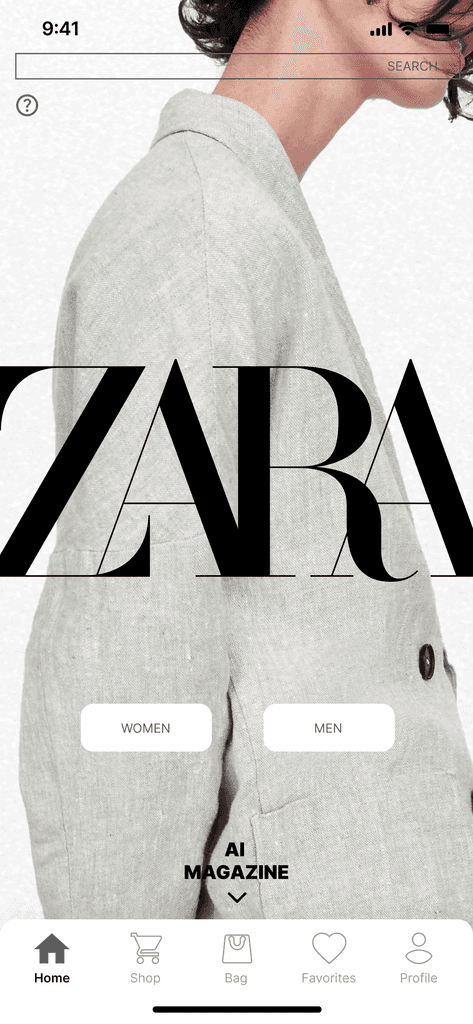
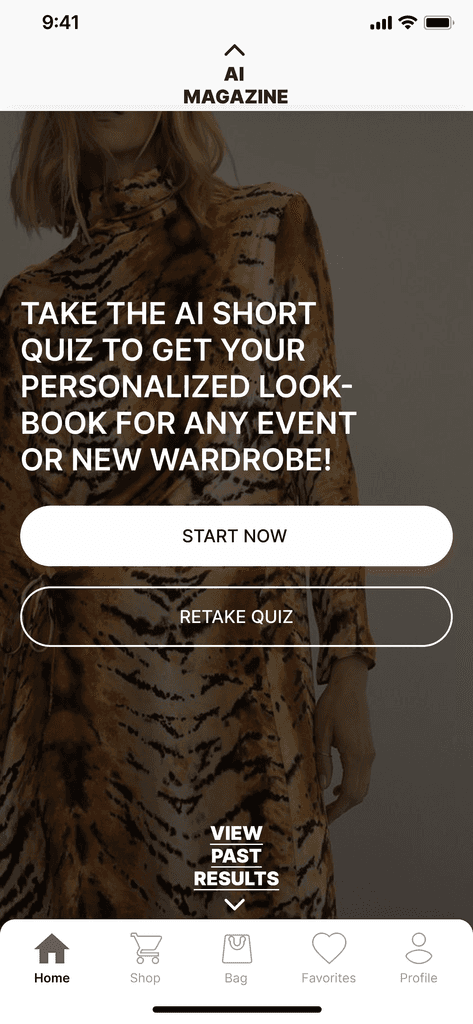
1) Enhance Personalization
Problem: Random recommendations didn’t match user taste
Insight: Users wanted an app that “knew” their preferences
Solution: Added a short style quiz and contextual product feed
Impact: Users described it as “more curated, less random"
2) Improve Homepage Layout
Problem: Beautiful visuals lacked guidance.
Insight: Editorial photography overpowered function.
Solution: Introduced clear category cards and stronger hierarchy.
Impact: Users located desired sections in one glance.
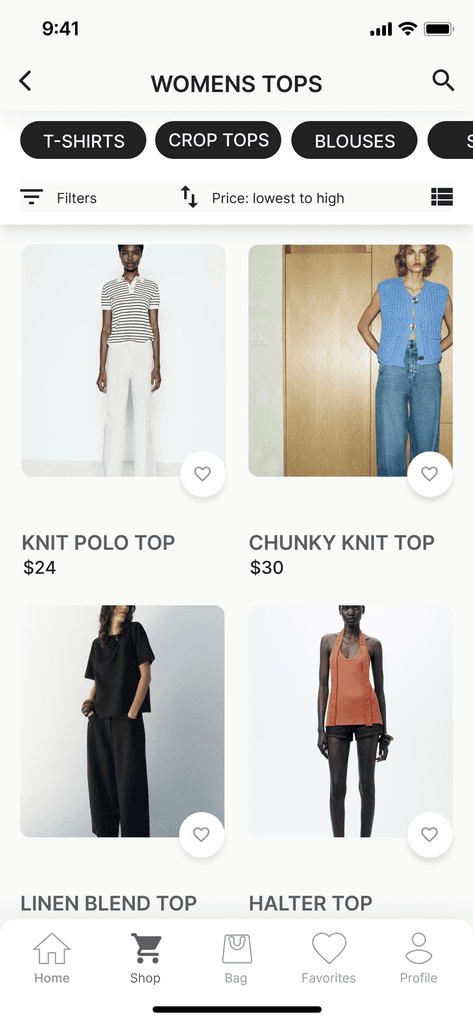
3) Refine Shopping Page & Favorites
Problem: Grid inconsistency made comparison hard
Insight: Shoppers wanted control and organization
Solution: Standardized image sizes and added custom lists (e.g., “Workwear,” “Vacation”)
Impact: Shopping felt simpler and less overwhelming
Phase 06 - Validation & User Perception
After building a mid-fidelity prototype, I shared the redesign with 6 previous participants for a quick feedback round. Instead of a full usability retest, I focused on perceived clarity and satisfaction.
Method: short online questionnaire + single NPS-style rating.
Highlights:
Average NPS increased from 12 → 48
5 of 6 users said the layout felt “more structured”
4 of 6 said navigation “made more sense instantly”
100% said they would prefer this new layout over the old one
Validation
User sentiment strongly suggested that the redesign improved both clarity and overall satisfaction — validating the core design directions before higher-fidelity testing.
Phase 07 - Reflection & Learnings
Reflection
Redesigning Zara's app taught me how deeply user feedback and behavioral insights shape the design of a shopping app and how principles from e-commerce and retail psychology influence decision-making and engagement.
I also learned to balance usability with business objectives, ensuring the design not only feels intuitive but also drives engagement and conversions.
Most importantly, this project reinforced the value of a research-driven approach. By grounding every decision in real user input and data, I was able to identify genuine pain points and design solutions that created measurable improvements in both clarity and satisfaction.
Reflection
Phase 07 - Reflection & Learnings
Redesigning Zara's app taught me how deeply user feedback and behavioral insights shape the design of a shopping app and how principles from e-commerce and retail psychology influence decision-making and engagement.
I also learned to balance usability with business objectives, ensuring the design not only feels intuitive but also drives engagement and conversions.
Most importantly, this project reinforced the value of a research-driven approach. By grounding every decision in real user input and data, I was able to identify genuine pain points and design solutions that created measurable improvements in both clarity and satisfaction.
Reflection
KEY TAKEAWAYS
Minimalism works only with strong information hierarchy
Personalization must feel transparent and empowering
Research-driven iteration builds user trust
Minimalism works only with strong information hierarchy
Personalization must feel transparent and empowering
Research-driven iteration builds user trust
OUTCOME SUMMARY:
Before: Frustrating, cluttered, and disorienting
After: Curated, personalized, and effortless, while aligned with Zara’s modern luxury aesthetic
Before: Frustrating, cluttered, and disorienting
After: Curated, personalized, and effortless, while aligned with Zara’s modern luxury aesthetic