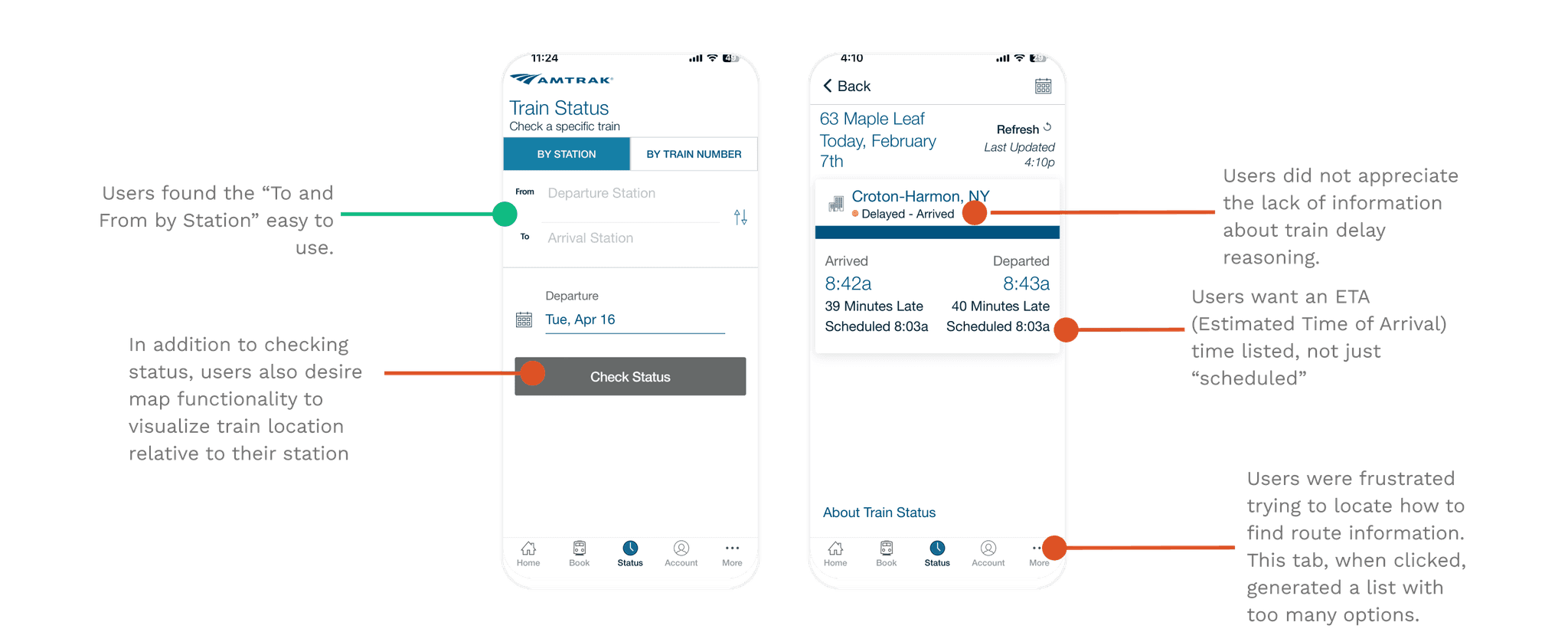
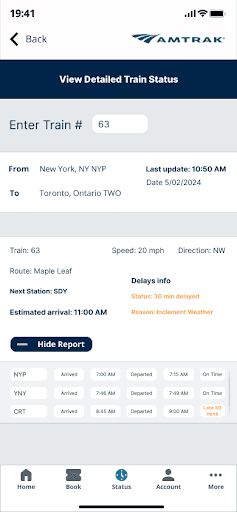
The Amtrak app is essential for train travelers, but users consistently struggled to find where their train actually was. Through early reviews and feedback, we discovered the issue wasn’t missing data: it was buried and unclear design.
“I just want to see where my train is and why it’s delayed.”
Our objective was to simplify how users access train status, routes, and delay information, all while keeping the experience aligned with Amtrak’s existing system.
Solution
Prioritizing live tracking, clearer delay explanations, and improved navigation for station and route details
...with a goal of increasing customer service satisfaction and operational transparency
Research
To uncover user pain points, we ran interviews and a usability test on the existing app. Participants were asked to complete real tasks, such as checking a train’s live status and finding delay details.
Most users could complete simple actions but quickly hit roadblocks when trying to locate information that should’ve been obvious.
Most users were frustrated that they could check if the train’s late, but not why it’s late.
USER INTERVIEWS & USABILITY TESTING
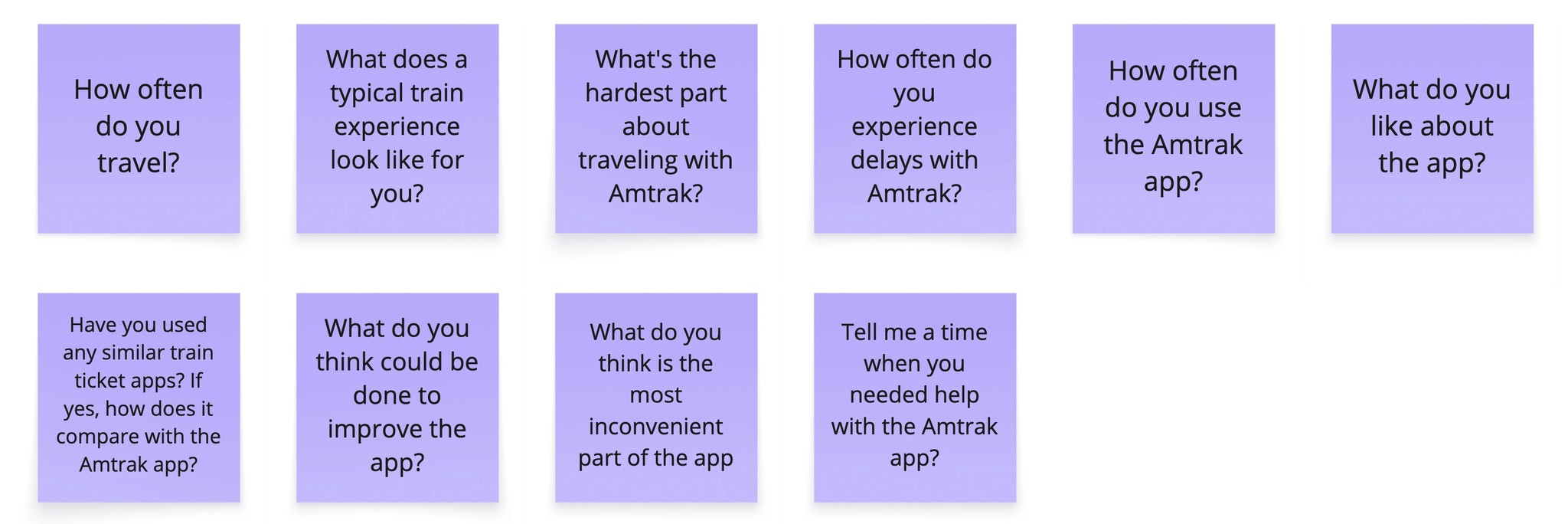
These questions below helped to gather insight into the user experience and pain points before testing. 80% of participants mainly expressed frustration over the lack of clear delay reasons and the difficulty of locating station and route information
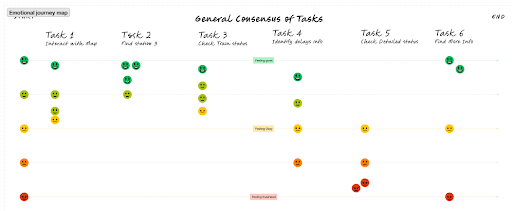
During the usability test, people reported having a neutral experience with the tasks. The positives they felt with the ticket booking and train status process were mitigated by the frustration of looking for route information and the lack of a map feature:
To uncover user pain points, we ran interviews and a usability test on the existing app. Participants were asked to complete real tasks, such as checking a train’s live status and finding delay details.
Most users could complete simple actions but quickly hit roadblocks when trying to locate information that should’ve been obvious.
Most users were frustrated that they could check if the train’s late, but not why it’s late.
USER INTERVIEWS & USABILITY TESTING
These questions below helped to gather insight into the user experience and pain points before testing. 80% of participants mainly expressed frustration over the lack of clear delay reasons and the difficulty of locating station and route information
Research
To uncover user pain points, we ran interviews and a usability test on the existing app. Participants were asked to complete real tasks, such as checking a train’s live status and finding delay details.
Most users could complete simple actions but quickly hit roadblocks when trying to locate information that should’ve been obvious.
Most users were frustrated that they could check if the train’s late, but not why it’s late.
USER INTERVIEWS & USABILITY TESTING
These questions below helped to gather insight into the user experience and pain points before testing. 80% of participants mainly expressed frustration over the lack of clear delay reasons and the difficulty of locating station and route information
During the usability test, people reported having a neutral experience with the tasks. The positives they felt with the ticket booking and train status process were mitigated by the frustration of looking for route information and the lack of a map feature:
Phase 06 - Testing & Iteration
Phase 03 - Key Insights
Key Insights from Research
Key Insights from Research
Key Insights from Research
AFFINITY MAPPING
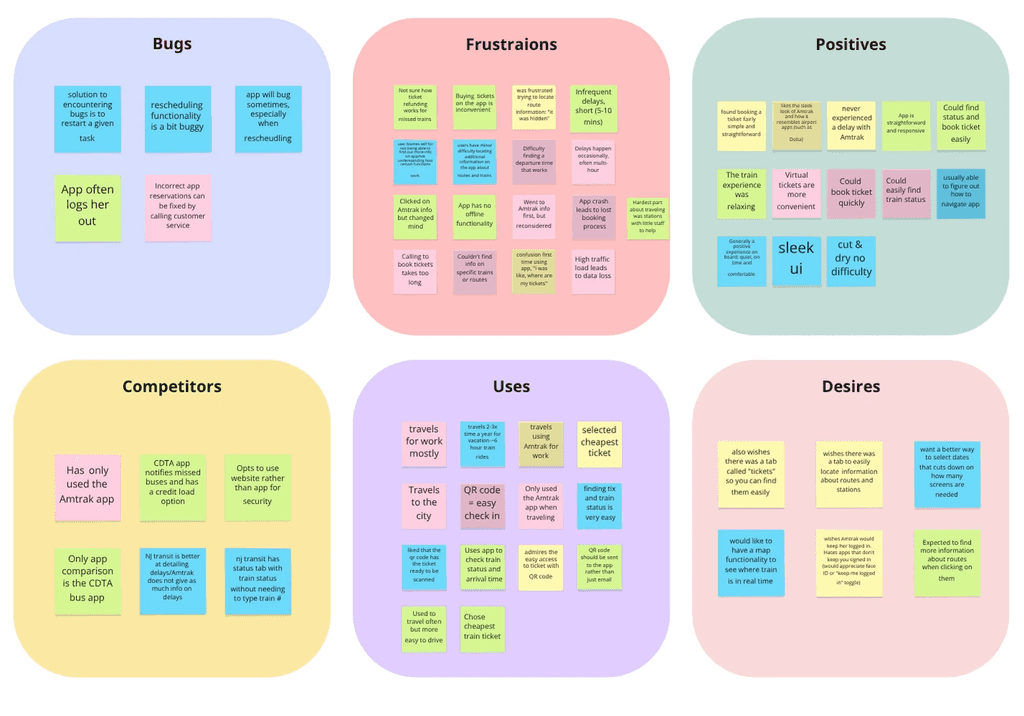
After synthesizing interview and testing data through affinity mapping, three key themes emerged:
1) Lack of visibility: Users couldn’t track trains or understand where delays originated. They wanted a visual way of tracking their train.
2) Low transparency: Delay reasons were vague, leaving travelers uncertain
3) Navigation overload: Route and station info were hidden under too many menus
These insights helped us reframe the problem: Instead of just redesigning a page, we needed to rebuild trust through clarity.
After synthesizing interview and testing data through affinity mapping, three key themes emerged:
1) Lack of visibility: Users couldn’t track trains or understand where delays originated. They wanted a visual way of tracking their train.
2) Low transparency: Delay reasons were vague, leaving travelers uncertain
3) Navigation overload: Route and station info were hidden under too many menus
These insights helped us reframe the problem: Instead of just redesigning a page, we needed to rebuild trust through clarity.
After synthesizing interview and testing data through affinity mapping, three key themes emerged:
1) Lack of visibility: Users couldn’t track trains or understand where delays originated. They wanted a visual way of tracking their train.
2) Low transparency: Delay reasons were vague, leaving travelers uncertain
3) Navigation overload: Route and station info were hidden under too many menus
These insights helped us reframe the problem: Instead of just redesigning a page, we needed to rebuild trust through clarity.
These questions below helped to gather insight into the user experience and pain points before testing. 80% of participants mainly expressed frustration over the lack of clear delay reasons and the difficulty of locating station and route information
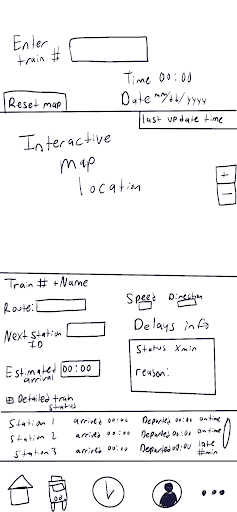
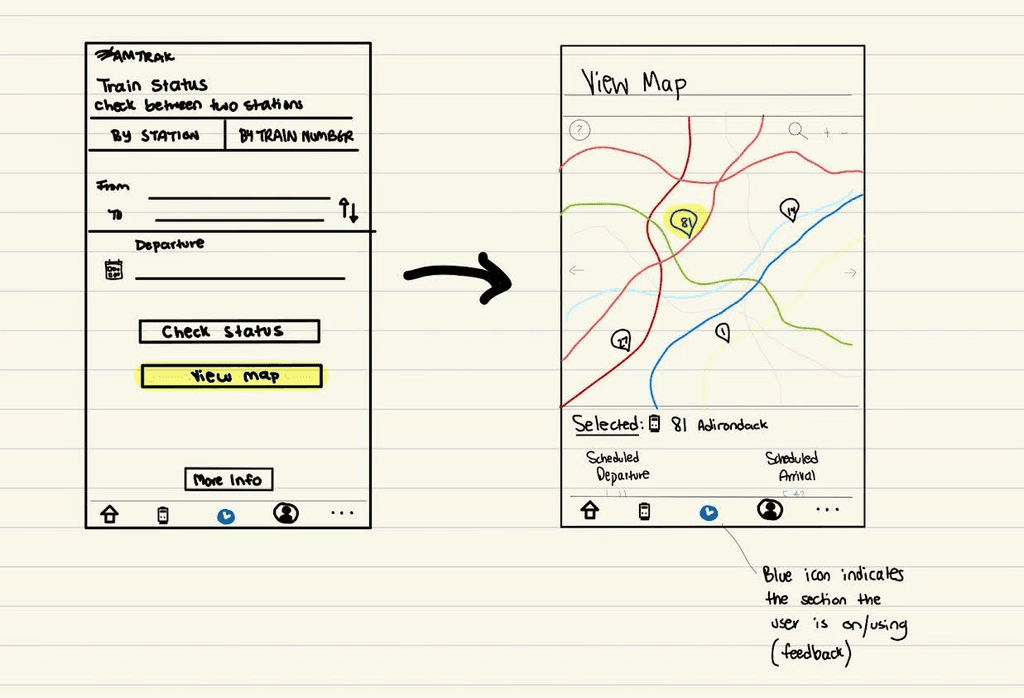
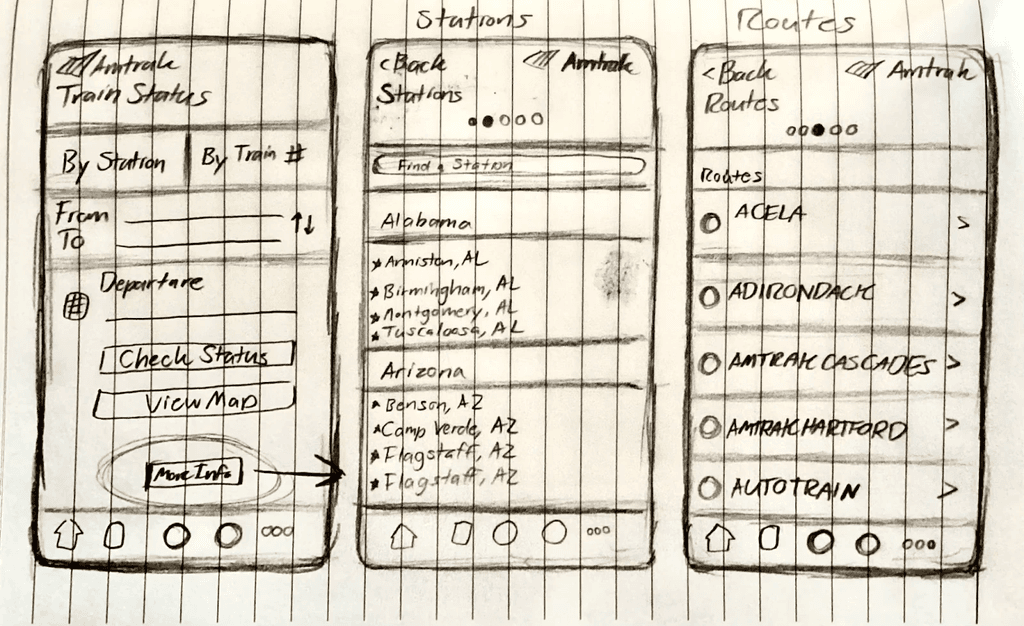
We began with sketches and mid-fidelity wireframes, mapping user flows that emphasized hierarchy, speed, and ease of access.
The new structure guided users from: Check Status Tab→ View Live Map → Access Station Details seamlessly, without extra clicks
Phase 06 - Testing & Iteration
Reflection
Testing showed measurable improvement across clarity, efficiency, and user satisfaction:
Faster Task Completion: Users located info in 1–2 screens instead of 4–5
Higher Satisfaction: Clearer hierarchy reduced confusion and stress
Improved Accessibility: Larger targets and simplified layouts improved tap accuracy
Phase 08 - Reflection & Next Steps
Final Prototype & Findings
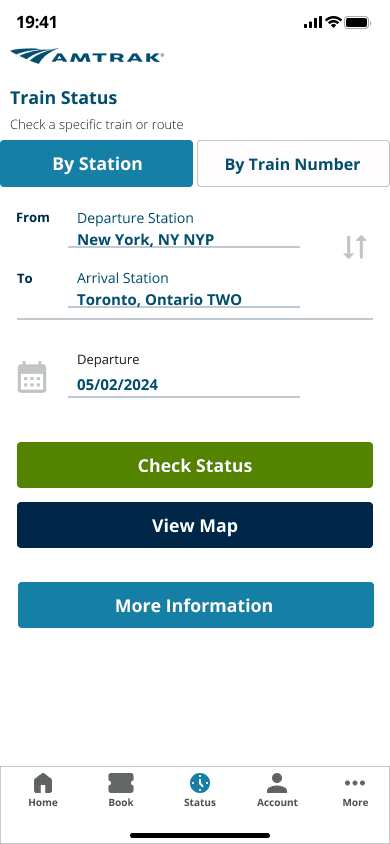
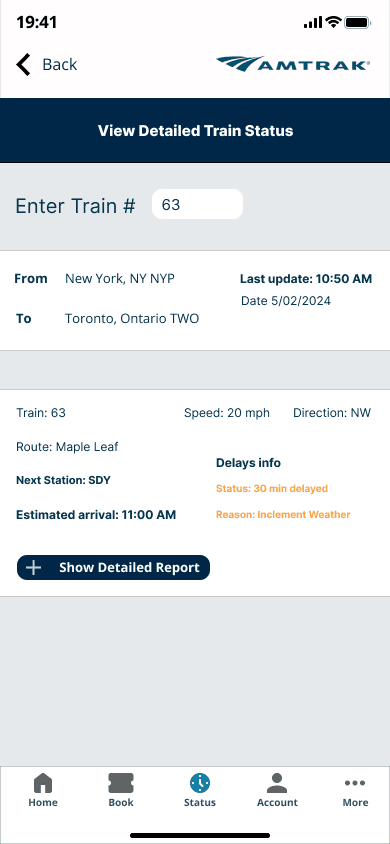
STATUS
An updated status page that allows users to see real-time updates of train status and delays.
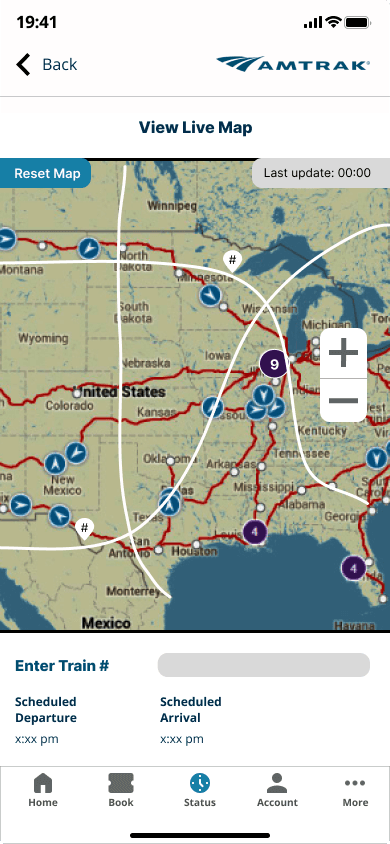
MAP
A newly added live-map feature so that users can see their train status in real-time.
NAVIGATION
A newly added "More Info" button for easier navigation to find in depth-station information.
STATUS
An updated status page that allows users to see real-time updates of train status and delays.
MAP
A newly added live-map feature so that users can see their train status in real-time.
NAVIGATION
A newly added "More Info" button for easier navigation to find in depth-station information.
STATUS
An updated status page that allows users to see real-time updates of train status and delays.
MAP
A newly added live-map feature so that users can see their train status in real-time.
NAVIGATION
A newly added "More Info" button for easier navigation to find in depth-station information.
STATUS
An updated status page that allows users to see real-time updates of train status and delays.
MAP
A newly added live-map feature so that users can see their train status in real-time.
NAVIGATION
A newly added "More Info" button for easier navigation to find in depth-station information.
Testing
USABILITY TESTING & JOURNEY MAP
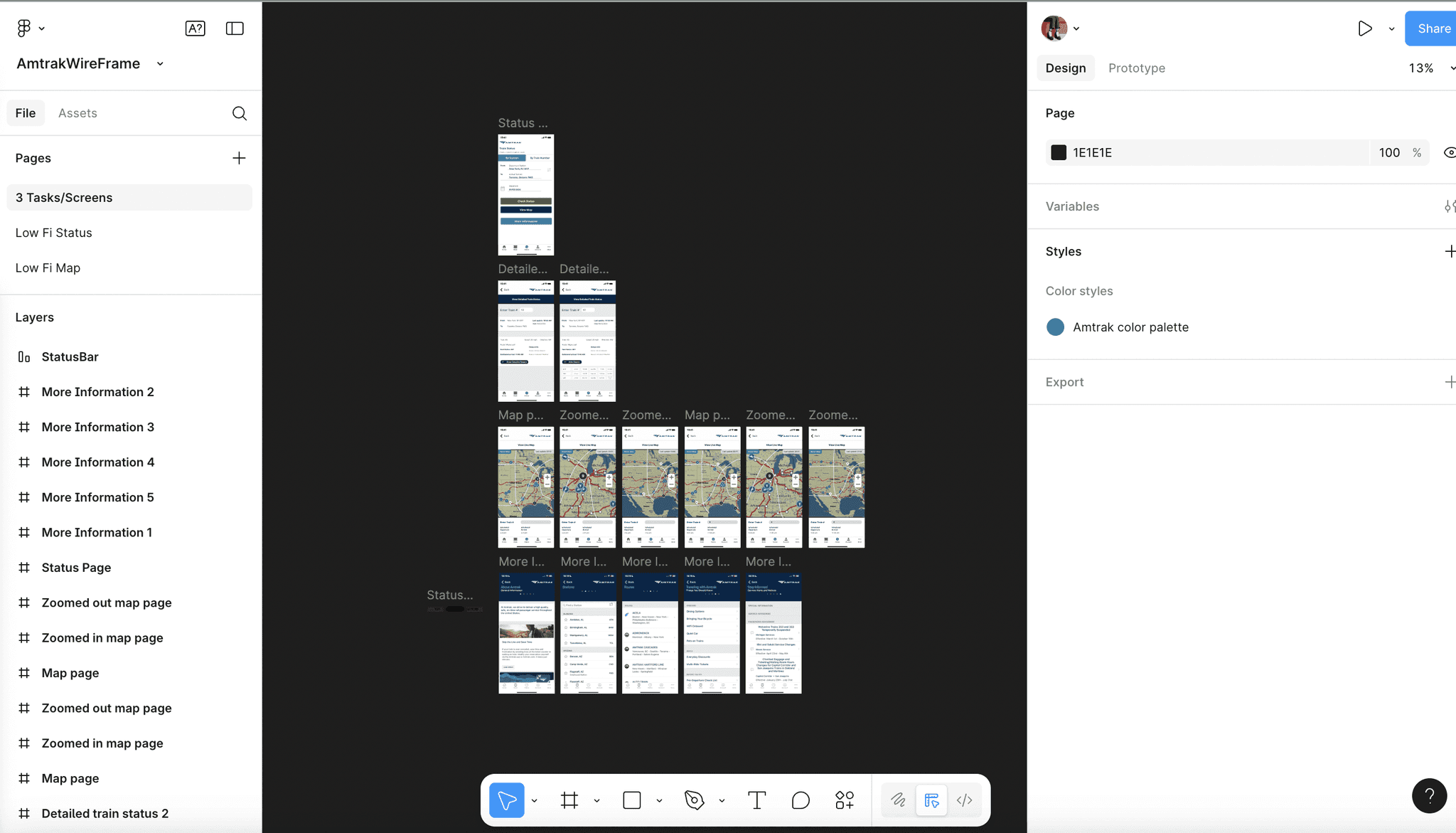
Our usability test of the mid/hi-fi prototypes and journey map revealed the following:
MOST DIFFICULT TASK:
Finding the detailed status report and finding which station had delays (Task 5)
Largest source of frustration and errors
SATISFACTION:
Users generally satisfied with contents of More Information tab and Status page
Users enjoyed the map function
Iterations
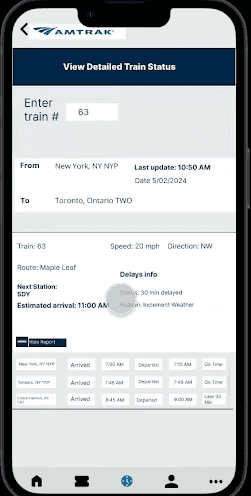
To combat issues from Task 5, the following UI iterations were made:
MAIN ISSUES
Accessibility: font and buttons too small on train status page and report
Content in Delays info blended in too much
Minor prototype bugs
Bottom navigation icons unlabeled
MAIN ISSUES
Accessibility: font and buttons too small on train status page and report
Content in Delays info blended in too much
Minor prototype bugs
Bottom navigation icons unlabeled
MAIN ISSUES
Accessibility: font and buttons too small on train status page and report
Content in Delays info blended in too much
Minor prototype bugs
Bottom navigation icons unlabeled
REVISIONS
Made font bigger and utilized station IDs more, made buttons bigger
Changed color of Delays info
Fixed map zoom in bug
Labeled bottom navigation appropriately
REVISIONS
Made font bigger and utilized station IDs more, made buttons bigger
Changed color of Delays info
Fixed map zoom in bug
Labeled bottom navigation appropriately
REVISIONS
Made font bigger and utilized station IDs more, made buttons bigger
Changed color of Delays info
Fixed map zoom in bug
Labeled bottom navigation appropriately
Phase 07 - Results & Findings
Final Prototype & Findings
STATUS
An updated status page that allows users to see real-time updates of train status and delays.
MAP
A newly added live-map feature so that users can see their train status in real-time.
NAVIGATION
A newly added "More Info" button for easier navigation to find in depth-station information.
STATUS
An updated status page that allows users to see real-time updates of train status and delays.
MAP
A newly added live-map feature so that users can see their train status in real-time.
NAVIGATION
A newly added "More Info" button for easier navigation to find in depth-station information.
STATUS
An updated status page that allows users to see real-time updates of train status and delays.
MAP
A newly added live-map feature so that users can see their train status in real-time.
NAVIGATION
A newly added "More Info" button for easier navigation to find in depth-station information.
STATUS
An updated status page that allows users to see real-time updates of train status and delays.
MAP
A newly added live-map feature so that users can see their train status in real-time.
NAVIGATION
A newly added "More Info" button for easier navigation to find in depth-station information.
Testing showed measurable improvement across clarity, efficiency, and user satisfaction:
Faster Task Completion: Users located info in 1–2 screens instead of 4–5
Higher Satisfaction: Clearer hierarchy reduced confusion and stress
Improved Accessibility: Larger targets and simplified layouts improved tap accuracy
Phase 08 - Reflection & Next Steps
Reflection
Reflection
This project reinforced the power of small interaction details, as a missing delay reason or an unlabeled map can quickly erode user trust. Through testing and iteration, I learned that clarity creates confidence for travelers relying on real-time information.
KEY TAKEAWAYS
Working on Amtrak taught me that UX design isn’t just about aesthetics; it’s about reducing uncertainty and helping users feel informed every step of the way.
OUTCOME SUMMARY:
KEY TAKEAWAYS
Before: Hidden train data and vague delay explanations left users guessing After: Clear live tracking and streamlined navigation restored confidence and ease